Odeo App: Accessibility Learning Platform
Odeo App: Accessibility Learning Platform
"Accessible design is good design — it benefits people who don't have disabilities as well as people who do. Accessibility is all about removing barriers and providing the benefits of technology for everyone."
— Steve Ballmer
"Accessible design is good design — it benefits people who don't have disabilities as well as people who do. Accessibility is all about removing barriers and providing the benefits of technology for everyone."
— Steve Ballmer
My Role
My Role
Product Designer & Developer
I owned the entire project from concept to execution, working independently to bring Ôdēō to life.
Responsibilities:
Secondary research and competitive analysis
User experience design
UI design and visual design system
Accessibility feature design and implementation
Prototyping and development using FigmaMake
Iterative testing and refinement
Product Designer & Developer
I owned the entire project from concept to execution, working independently to bring Ôdēō to life.
Responsibilities:
Secondary research and competitive analysis
User experience design
UI design and visual design system
Accessibility feature design and implementation
Prototyping and development using FigmaMake
Iterative testing and refinement
Accessibility in Design
Accessibility in Design
Accessibility is an important part of design. Accessibility means designing products, services, and environments for people with disabilities whether permanent or temporary.
Accessibility ensures Kate, a user with dyslexia, John, a user with partial blindness, and Adam, a user with temporary loss of hearing experience the products in a way that serves their goals successfully without hindrance.
Accessibility is an important part of design. Accessibility means designing products, services, and environments for people with disabilities whether permanent or temporary.
Accessibility ensures Kate, a user with dyslexia, John, a user with partial blindness, and Adam, a user with temporary loss of hearing experience the products in a way that serves their goals successfully without hindrance.
The Problem Statement
The Problem Statement
Many learners face barriers with traditional written content—whether due to disabilities, learning preferences, or circumstances. Existing text-to-audio solutions often treat accessibility as an afterthought rather than a foundation, creating complex interfaces that add barriers instead of removing them.
Many learners face barriers with traditional written content—whether due to disabilities, learning preferences, or circumstances. Existing text-to-audio solutions often treat accessibility as an afterthought rather than a foundation, creating complex interfaces that add barriers instead of removing them.
The Solution
The Solution
A learning platform beyond the traditional. An accessible AI-powered platform that converts texts and files into audio, addressing challenges many face with written content whether due to disabilities or preference for audio learning.
Key Features:
Text-to-Speech: Convert pasted text to audio
File-to-Speech: Upload PDFs/TXT for conversion
Dyslexic-friendly fonts (OpenDyslexic with Comic Sans backup)
Adjustable font sizes and playback speeds
Multiple voice options
Session history for managing past conversions
A learning platform beyond the traditional. An accessible AI-powered platform that converts texts and files into audio, addressing challenges many face with written content whether due to disabilities or preference for audio learning.
Key Features:
Text-to-Speech: Convert pasted text to audio
File-to-Speech: Upload PDFs/TXT for conversion
Dyslexic-friendly fonts (OpenDyslexic with Comic Sans backup)
Adjustable font sizes and playback speeds
Multiple voice options
Session history for managing past conversions
Target Users
Target Users
People with disabilities needing tailored reading experience
Students making learning more flexible
Busy professionals consuming content on-the-go
Audio learners preferring listening over reading
People with disabilities needing tailored reading experience
Students making learning more flexible
Busy professionals consuming content on-the-go
Audio learners preferring listening over reading
User Flow
User Flow
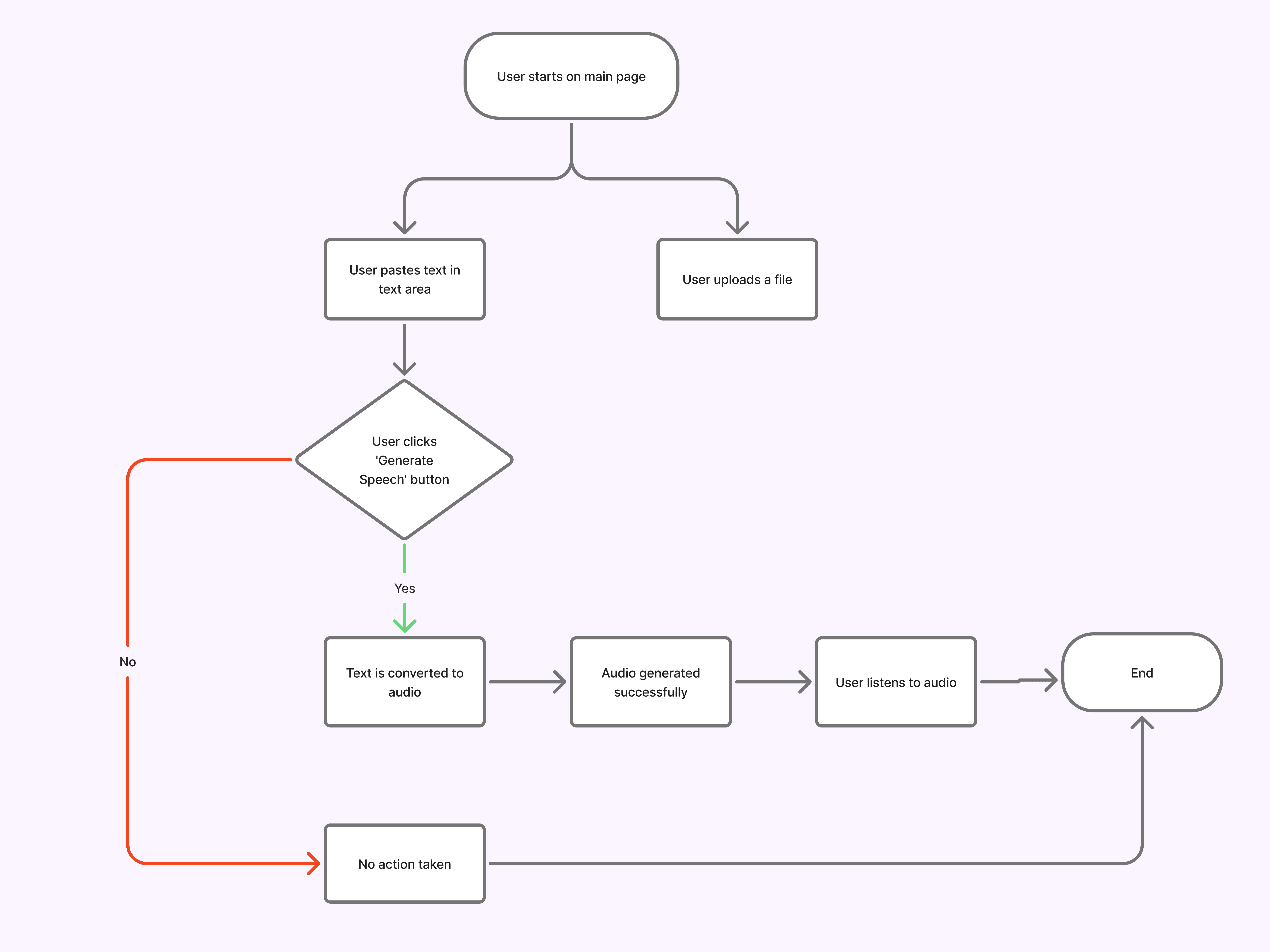
I designed a streamlined flow that removes friction between the user and their goal: converting text to audio. Whether pasting text or uploading a file, users reach their audio output in just a few taps.
I designed a streamlined flow that removes friction between the user and their goal: converting text to audio. Whether pasting text or uploading a file, users reach their audio output in just a few taps.
Developing the app with FigmaMake
Developing the app with FigmaMake
To bring Ôdēō to life, I used Figma's AI feature, FigmaMake, to rapidly prototype and develop a functional application. The process was iterative: inject prompt → refine → test → edit → repeat.
After over 200 prompts, I built a fully functional app entirely within Figma. This approach allowed me to move from concept to working prototype without leaving my design environment—blurring the line between design and development.
To bring Ôdēō to life, I used Figma's AI feature, FigmaMake, to rapidly prototype and develop a functional application. The process was iterative: inject prompt → refine → test → edit → repeat.
After over 200 prompts, I built a fully functional app entirely within Figma. This approach allowed me to move from concept to working prototype without leaving my design environment—blurring the line between design and development.
Ôdēō App Live Demo
Ôdēō App Live Demo
Conclusion & Lessons
Conclusion & Lessons
Building Ôdēō entirely within FigmaMake allowed me to iterate rapidly, test ideas immediately, and refine based on real interactions.
It wasn't all smooth sailing. I encountered challenges that required troubleshooting and re-prompting up to 7 times before finding solutions. But that friction taught me patience and problem-solving in a new design-development workflow. The beauty of working with AI? It doesn't get tired, and neither does your ability to iterate.
Ôdēō addresses real accessibility challenges for people with dyslexia, visual impairments, and audio learners. Accessible design isn't a feature. It's a responsibility.
Building Ôdēō entirely within FigmaMake allowed me to iterate rapidly, test ideas immediately, and refine based on real interactions.
It wasn't all smooth sailing. I encountered challenges that required troubleshooting and re-prompting up to 7 times before finding solutions. But that friction taught me patience and problem-solving in a new design-development workflow. The beauty of working with AI? It doesn't get tired, and neither does your ability to iterate.
Ôdēō addresses real accessibility challenges for people with dyslexia, visual impairments, and audio learners. Accessible design isn't a feature. It's a responsibility.
Got an innovative idea? Let's talk
©
Latifat Akinyemi
2026
Got an innovative idea? Let's talk
©
Latifat Akinyemi
2026
Got an innovative idea? Let's talk
©
Latifat Akinyemi
2026